

FAQ
Answers to common questions about Splitter and Matrix modes, resolutions, cables, audio hookup and the power supply.
ALL CHAPTERS
FAQ
What is the difference between Splitter and Matrix option, what are the options for each mode?
The below picture represents the available options for both mode.
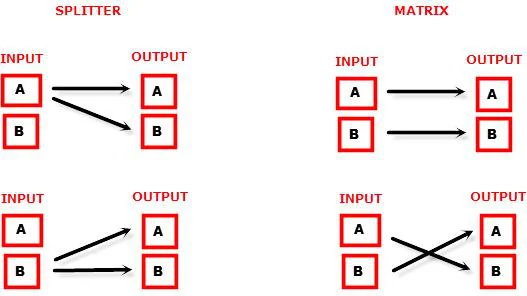
Can we pass-through 4K60 4:4:4 or any HDR signal and have one output at lower resolution?
Yes, when connected correctly to the right downscale output port, Vertex will automatically scale down UHD to FHD if required by the connected SINK (Display, AVR or others). Similarly it can scale up FHD to UHD if required by the connected SINK to the upscale port.
What is the Bluetooth working range with GoBlue?
You can connect and use the Bluetooth APP for iOS and Android with Vertex and GoBlue even when no signals are going through the Vertex. With or without any signals, in all cases, the Bluetooth range is over >10m.
→ See: Android / iOS appMy display is supposed to accept 4K60 4:4:4 signals but it does not work?
For most UHD TV set we tried, there are always extra configuration options to activate in order to achieve a 4K60 4:4:4 600MHz link. For ex, on Samsung: in order to enable the 444 colorspace for 4k in Samsung TV’s you must go to "settings" and "hdmi" and "UHD color" and enable it. Then also you must assign the HDMI port1 as "PC" in the tools menu. Only after these two steps will 600MHz be accepted. Similar activation tricks are required on most UHD TV’s. Additionally, most UHD TV’s only have specific ports that are 600MHz capable.
I have a PC mode on my TV (or a PC monitor) what resolutions are supported for graphics mode?
All PC graphics mode within the 600MHz bandwidth are supported, including ultra high resolution such as WQSXGA, QUXGA, QFHD, WQUXGA, 4K.
What output resolution does the Vertex support in HDTV mode?
All known SD, HD, Full HD and UHD formats are supported including: 480i50, 480i60, 480p50, 480p60, 576p50, 576p60, 720p50, 720p60, 720p100, 720p120, 1080i25, 1080i30, 1080p24, 1080p25, 1080p30, 1080p48, 1080p50, 1080p60, 1080p72, 1080p75, 1080p96, 1440p50, 1440p60, 2160p24, 2160p25, 2160p30, 2160p50, 2160p60 (these are examples only, anything within the 600MHz bandwidth is supported.)
What version of HDMI does the Vertex work with? Do I need HDMI 1.3/1.4a/2.0a/2.0b? Does it matter?
It does not matter. HDfury Vertex works with any version of HDMI from 1.0 and up.
Do I need to set anything special in my HDMI source device to set the resolution correctly?
No. The HDfury Vertex will be detected as 2160p60 4:4:4 capable device by your source and it will always accept and process the highest quality stream from your source devices. There is no need to set the HDMI source to any specific resolution.
Is there any latency (delay) introduced to the signal?
Virtually none. The latency added is in the order of a few pixel clocks only. Nothing noticeable at all.
What is the USB port for?
To provide power from the supplied USB power unit and for firmware upgrades when new (additional) functions and enhancements are offered.
What about long HDMI cable runs? Can I expect issues?
For 600MHz users must use "high speed" cables, or 600MHz/18Gbps certified, ideally the length should be between 6ft and 12ft for proper 600MHz/18Gbps pass-thru. For 4K30, 1080p or less almost all cables are ok. HDfury Vertex acts as a HDMI repeater device. So having HDfury Vertex in the path will amplify and recover the signal. You should not need any passive (or active) HDMI amplifiers, especially if you put the HDfury Vertex in the middle of your cable run. If you previously had to use an amplifier, the HDfury Vertex can most likely take its place. The HDfury Vertex has been used with 50 foot (and longer) HDMI cables without issues. However, please note that non-powered active cables that are taking power from HDMI connector might fail with default Power Supply and default power cord. To ensure support for any equipment taking power from HDMI connector at Vertex output, please use the port 1 of the optional Universal Power Supply to power your unit. Alternative options/solutions were published here.
How are the new lossless audio formats via HDMI input handled? E.g. DTS-HD/MA and DD/E-AC3: Are they stripped down to DTS core or Dolby Digital respectively to fit the requirements of the S/PDIF standard?
Lossless audio is transmitted through HDMI output only. HDfury Vertex does not compress or otherwise downconvert the incoming audio. Only stereo and 5.1 sound can be output via SPDIF output. The analog output supports stereo only.
How do I hook up the audio from the Vertex?
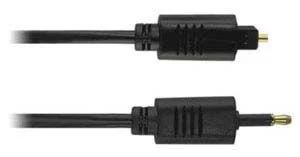
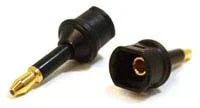
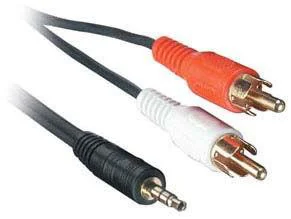
The Vertex has both analog and digital (TOSLINK) audio output in one connector labeled "D/A" along with a headphone symbol. It's a 2-in-1 connector meaning that you can plug in either a 3.5mm stereo analog jack or a digital mini-TOSLINK (3.5mm mini-jack) cable and get stereo analog sound or 5.1 Dolby/DTS digital sound out of the Vertex. See further below for pictures of both types of connectors/cables.
Vertex 3.5mm mini-TOSLINK digital audio cable:
If you'd like to use a "regular" TOSLINK cable, use a 3.5mm Mini-TOSLINK to regular TOSLINK adapter:
A 3.5mm stereo audio cable can be used for connecting the Vertex to a TV if you do not have a home theater setup (you only have 2 speakers in your TV):
Do I need to use the USB power supply?
Yes. Due to the advanced features, the Vertex draws more power than previous HDfury models. The Vertex power supply must be used at all times.
Is the Vertex power supply the same as that used by the HDfury1, HDfury2, and GammaX?
No. The power supply for the HDfury1, HDfury2 and GammaX kits are 0.5A max current. The HDfury3 is 1A max current. The Vertex power supply can supply up to 2.0A. Do not use an HDfury1, HDfury2, or GammaX power supplies with the Vertex.
What sort of power supply does the Vertex use?
Vertex power supply adheres to these requirements:
- Provides REGULATED (+/- 5%) 5VDC power with 2.0A min DC current
- Delivers the power through a mini usb connector.
Trying to use an AC/DC adaptor that doesn't adhere to these three requirements may destroy the Vertex. Do not use the power supply from the HDfury1, HDfury2, or GammaX with the Vertex.
I tried to update my unit, it failed and Vertex is shown as USBBOOT under Windows?
Some users are reporting Vertex as USBBOOT USBXPRESS under windows after firmware update attempt. USBBOOT means Vertex is in the bootloader state, waiting for the actual FW
→ See: Firmware updateIt means that the update of MCU FW failed or was not even launched properly or cut in between. That leaves the device in bootloader ready to accept the FW update again. Make sure the PC Windows GUI is closed (not running), unplug/replug Vertex, eventually reboot your computer and launch the FW update again.
→ See: Firmware updateMake sure you are using the right Silabs driver for your Windows version and USB port version in use as per explanations on p.19
→ See: USB driver (Windows)Source: official User Manual 4K Vertex, Rev 1.30. Text and figures © HDfury, reproduced for Vertex owners.